
Color Design • Data Visualization • Mixed-initiative System
COLORMAKER
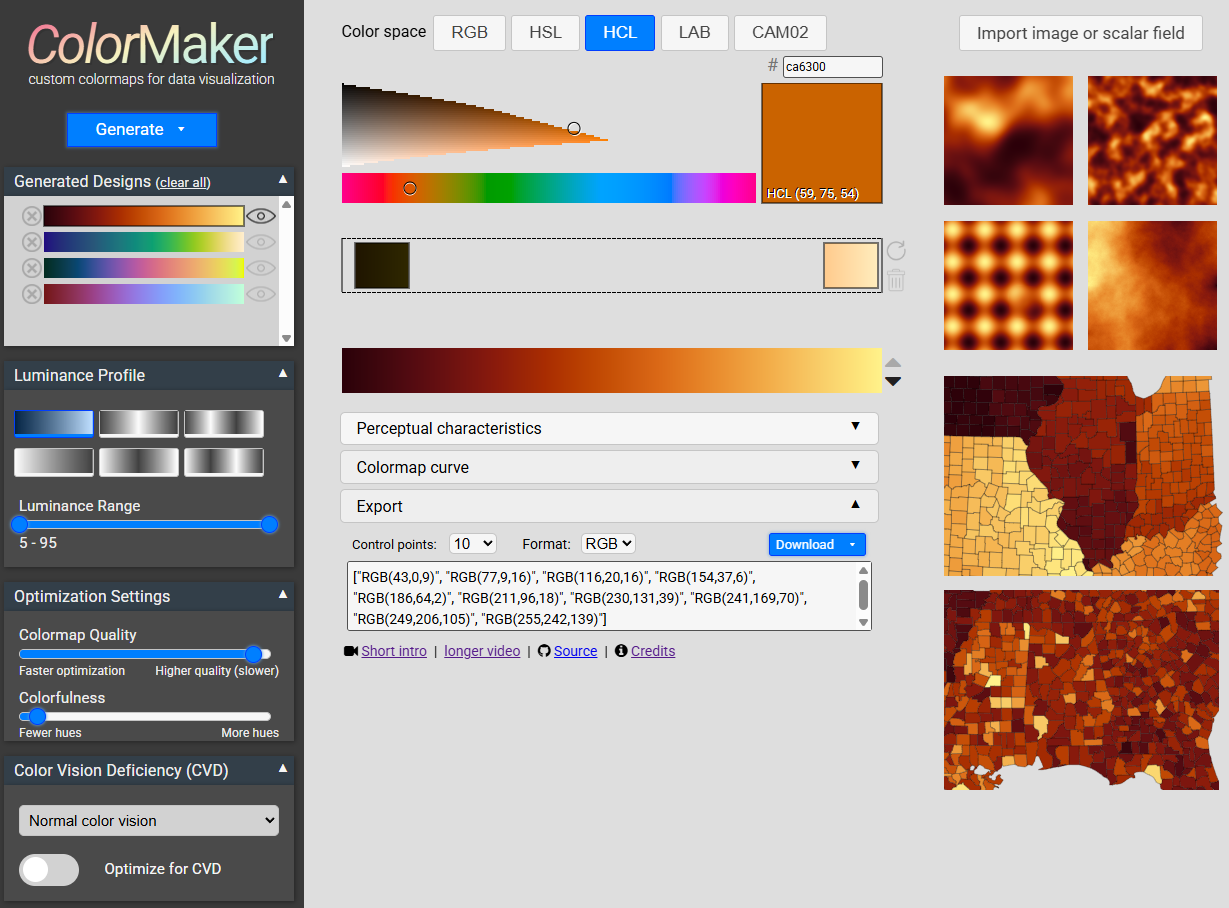
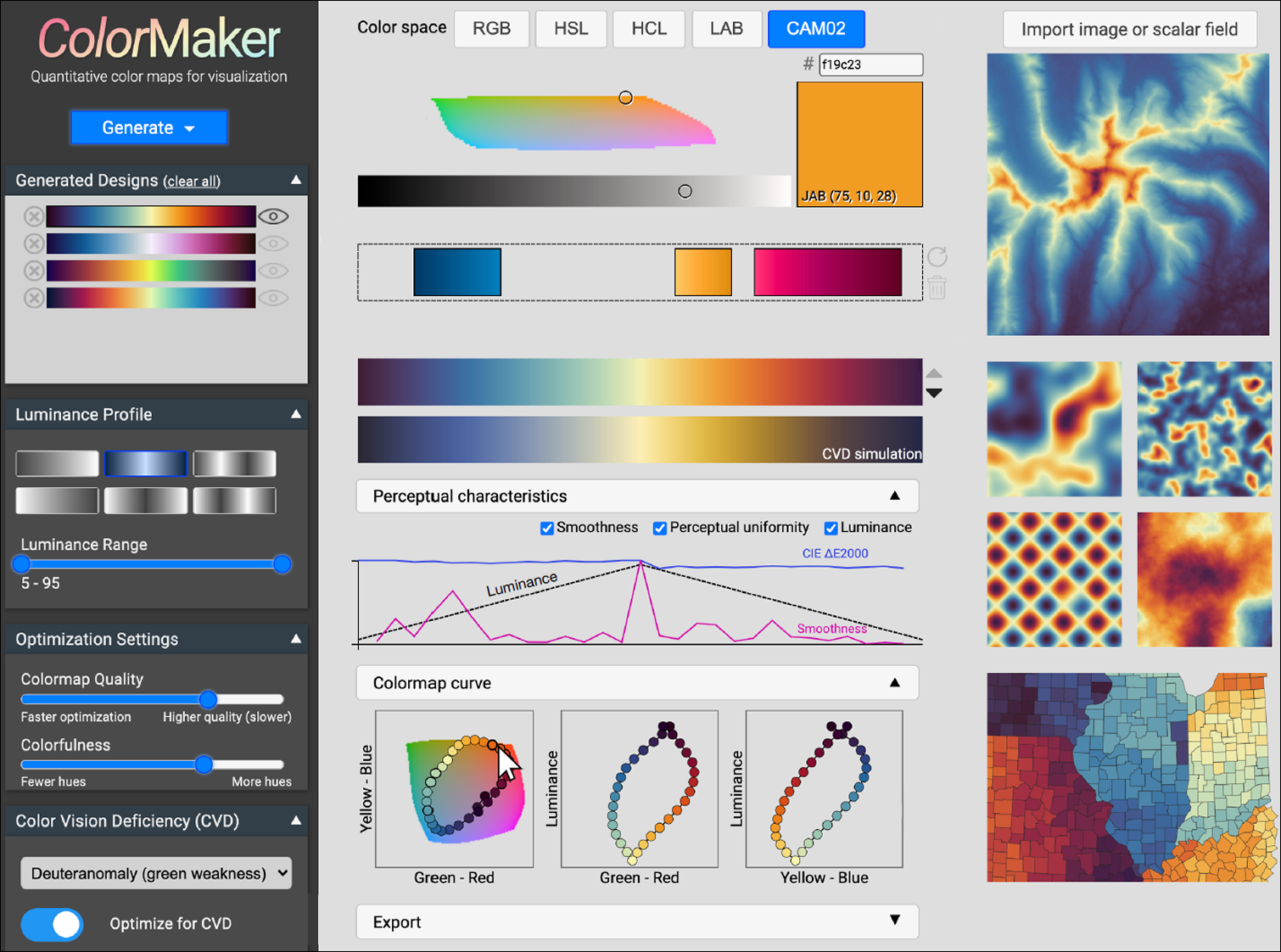
A color design tool for users to generate, refine, and evaluate customized continuous colormaps for data visualization. Features include interactive editing and real-time CVD simulation to support accessible data visualization.
BACKGROUND
Color is a critical visual encoding in data visualization, helping users interpret complex quantitative information such as weather patterns, scientific data, and geographic changes.
Designing effective continuous colormaps is challenging, as it requires balancing perceptual uniformity, accessibility, color conventions, and user preferences.
Most existing tools rely on predefined colormaps or complex manual controls, limiting flexibility and making customization difficult, especially for non-expert users.
THE PROBLEM
Current colormap design tools provide limited customization or require users to have expertise in perceptual color spaces, making them difficult for many designers to use.
Visualization designers often need custom colormaps that satisfy specific design requirements (e.g., particular colors at certain value ranges), which predefined palettes cannot easily accommodate.
There is a need for an intuitive, interactive tool that enables users to create and refine accessible, high-quality continuous colormaps without requiring advanced knowledge of color theory.
Research Objectives
Accessible for Non-Experts
Empower users of all experience levels to create effective colormaps with minimal learning curve.
High Customizability
Enable users to create and refine colormaps with extensive control over color and design parameters.
CVD Accessibility
Promote inclusive colormap designs by helping users optimize colormaps for people with color vision deficiencies.
Gathering Insights
Display Characteristics
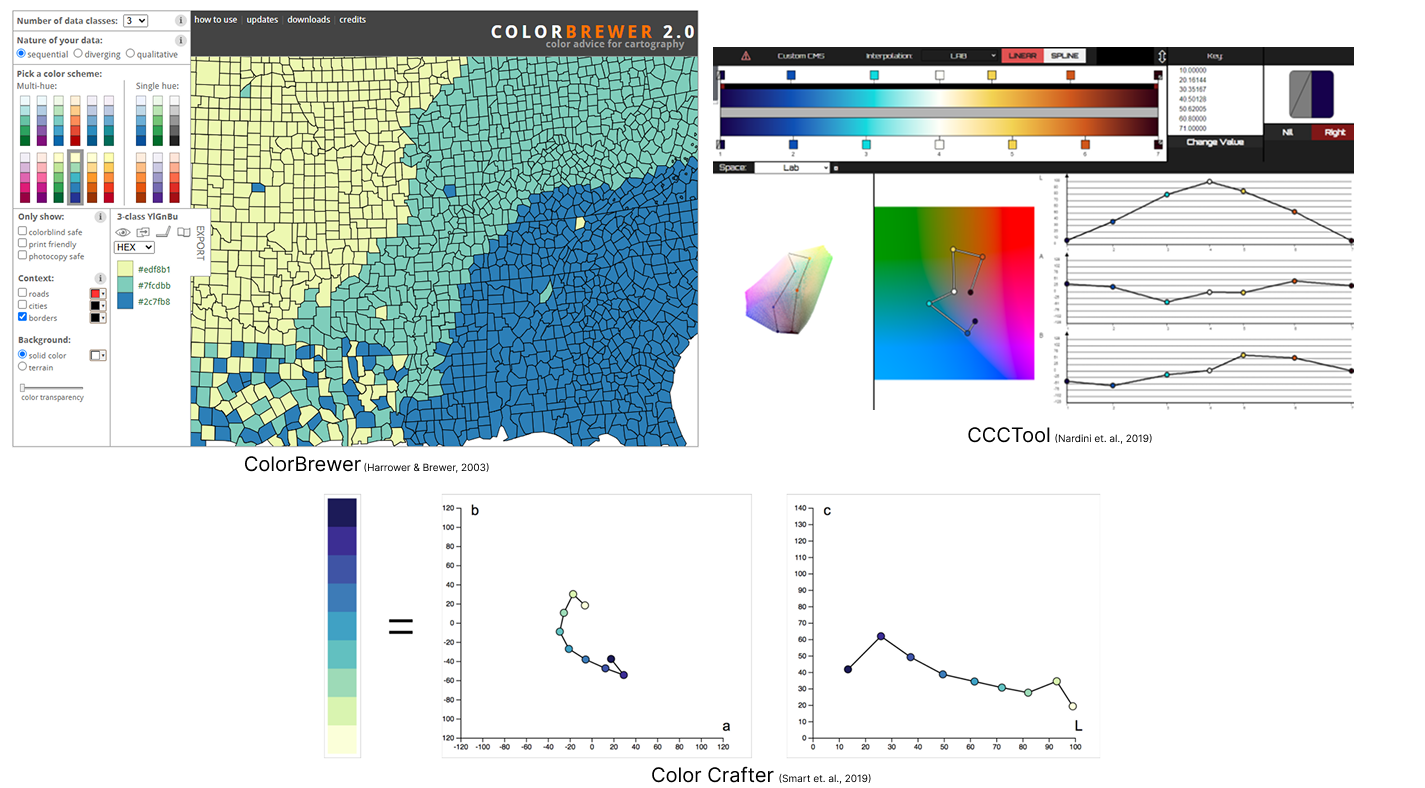
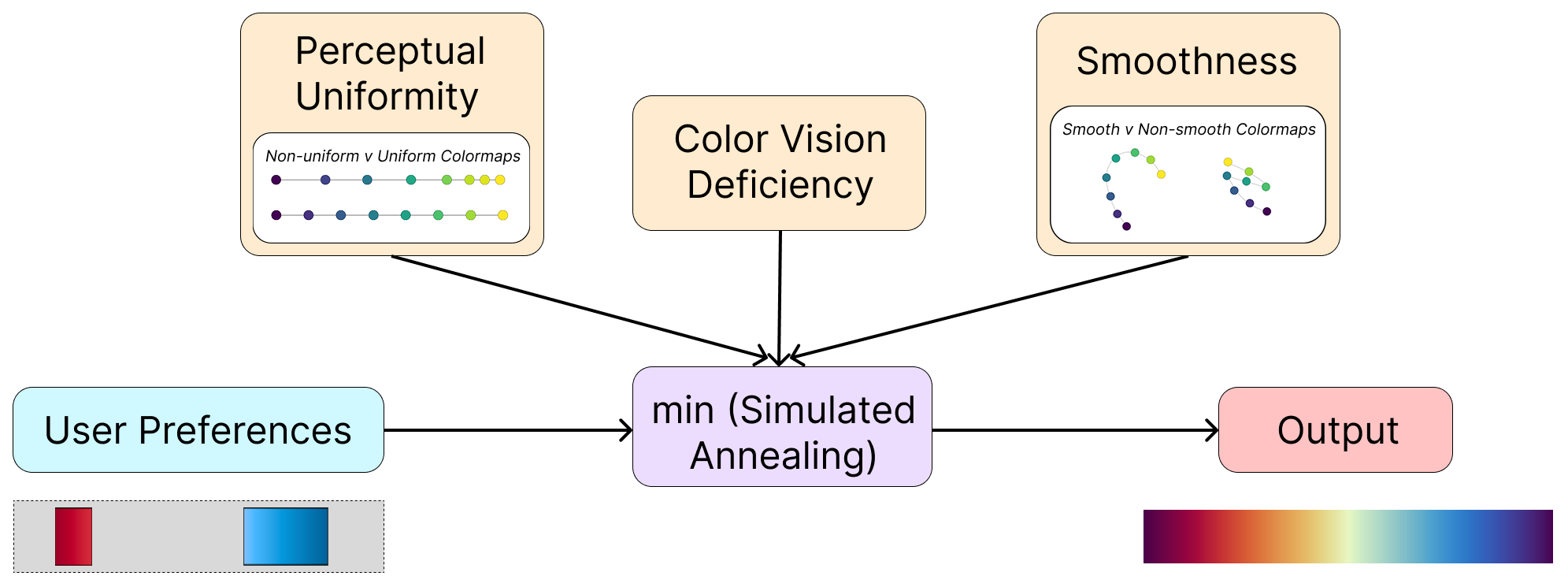
When choosing a colormap, users need their personal preferences balanced with the perceptual standards and meticulous placement of colors at control points to achieve a smooth and uniform color gradient.
To do so, the entire space of color solution should be explored within user's specifications, with the opportunity for user and computer to take turns to collaboratively refine the design.
Color Picker
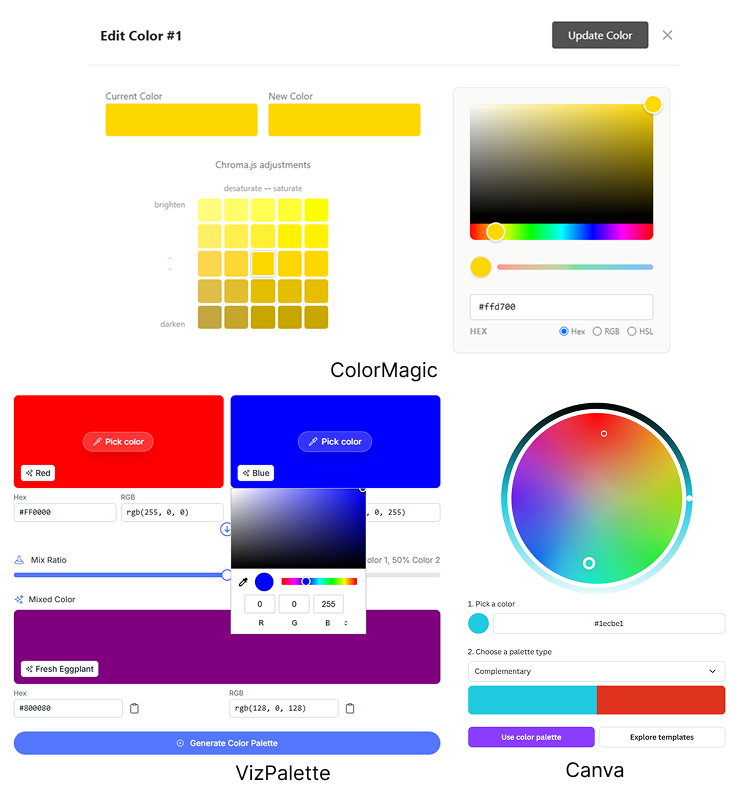
Users inexperienced in designing colormaps should be able to explore colors freely, with the help of standard, easy-to-use color pickers, with the help of intuitive drag-and-drop interactions.
Being new to color design, users should be able to experiment with color options with the option of the tool accepting uncertain and imprecise user inputs.
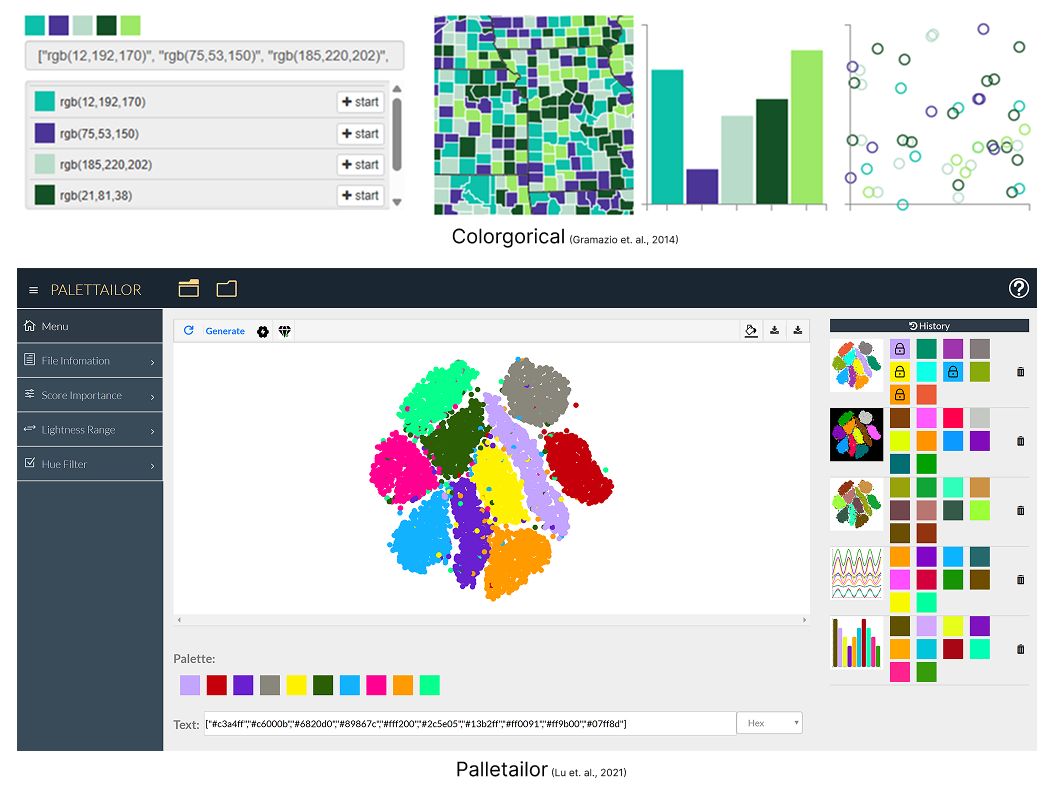
Editing & Refinement
Users should be able to start with a clear vision of the output in mind or with a vague concept, with the tool being able to accomodate partial inputs and alow refinements.
The Cost Function
To handle the user preferences and color design functionalities, simulated annealing was chosen as an ideal algorithm, allowing multiple iterations to explore the color space to find the ideal solution.
Initial Interface Designs
What did I Focus On?
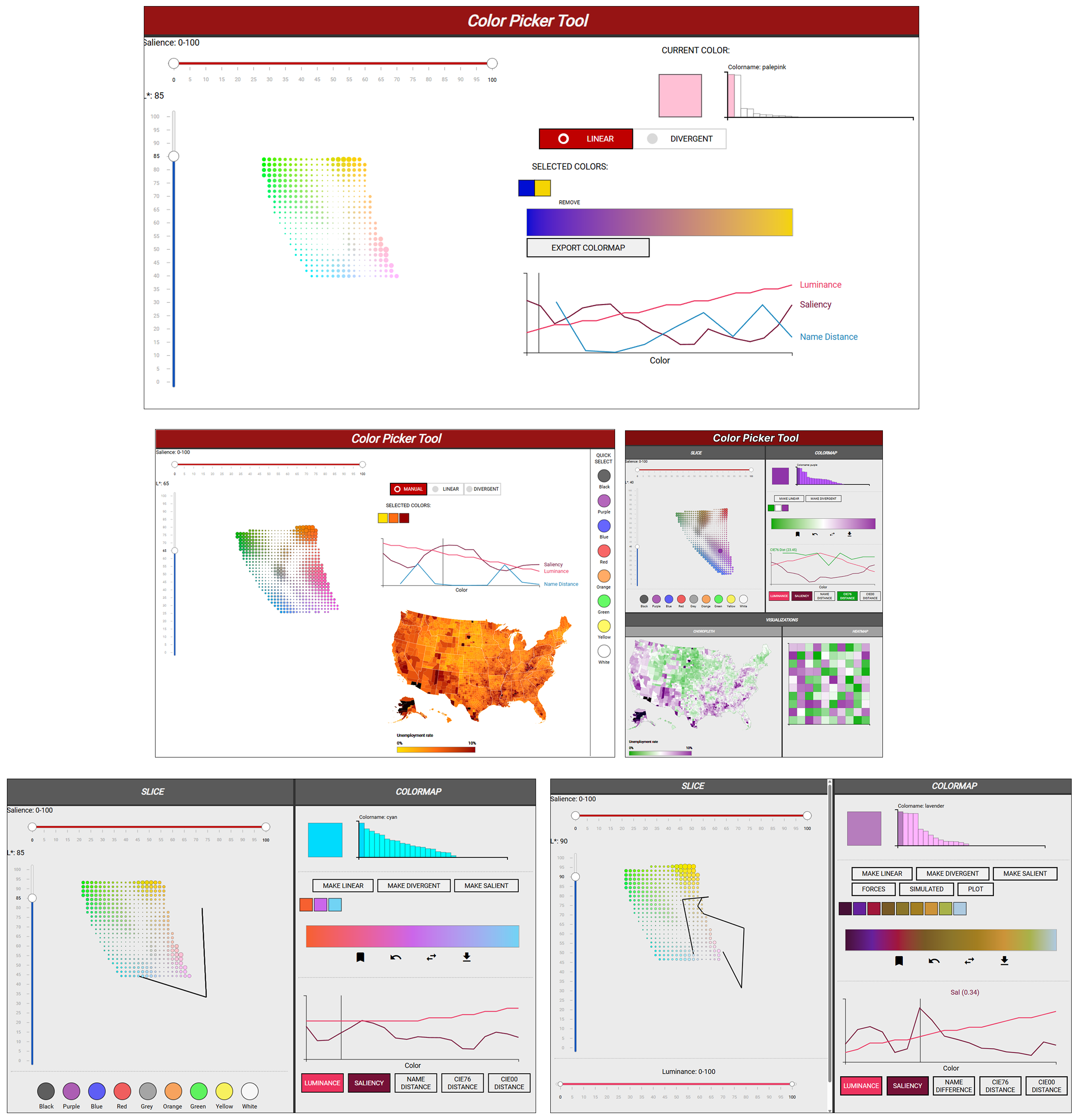
Before incorporating the algorithm, I experimented with designing an interface which will allow users to intitively select colors based on perception and add fucntionalties to make changes.
Color Picker
I focused on allowing users to pick colors based on their perception, which is why I chose the LAB color space, which displays colors by luminance (0 to 100). I further added sliders for saliency, which shows how colorful the chosen colors are.
Customization Features
I added multiple functionalities to allow users to move colors around as well as remove them. Further I experimented with adding buttons to swap between linear or diverging colormaps, while displaying the perception metrics of the colormap as line charts. Further, I also added buttons to go back to the previous step, reverse the colors, and save the current setup.
Algorithm
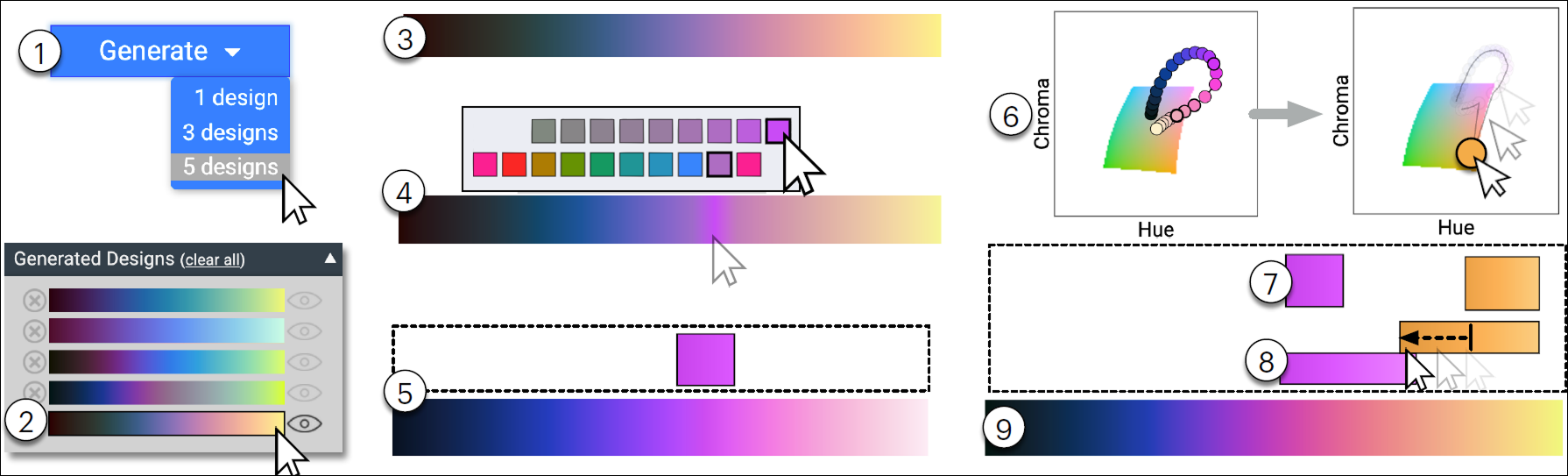
I added a button to generate colormaps after all necessary user selections are done, then powering up the algorithm. To test how the colors are located in the color space, I added a button to plot the geenrated colormap in the color space.
TESTING OBJECTIVES
I tested the colormap with users to test the usability of the color tool, and to check how intuitive the interface is.
Additionally, I took feedback on the quality of the colormaps generated, based on how smooth, perceptually uniform, and pleasant the colormaps looked.
USABILITY RESULTS
The feedback showed that users preferred the algorithm to geenrate the colormap directly, without the additional step of clicking a button. Additionally, users commented that the colormap generation took a long time without any indication of time remaining.
The users also noted the need to add intuitive buttons for luminance profile and other metrics, while emphasizing the need to enhance the overall interface.
Finally, I noted the repeated use of the "back" button, highlighting the need to add a history of geenrated colormaps, and also the need to generate multiple different colormaps from the same input.
Iterations & Refinement
To address the users' feedback, I made several refinements to the color tool. These included revamping the interface, adding new features, as well as modifying existing ones.
CVD Added
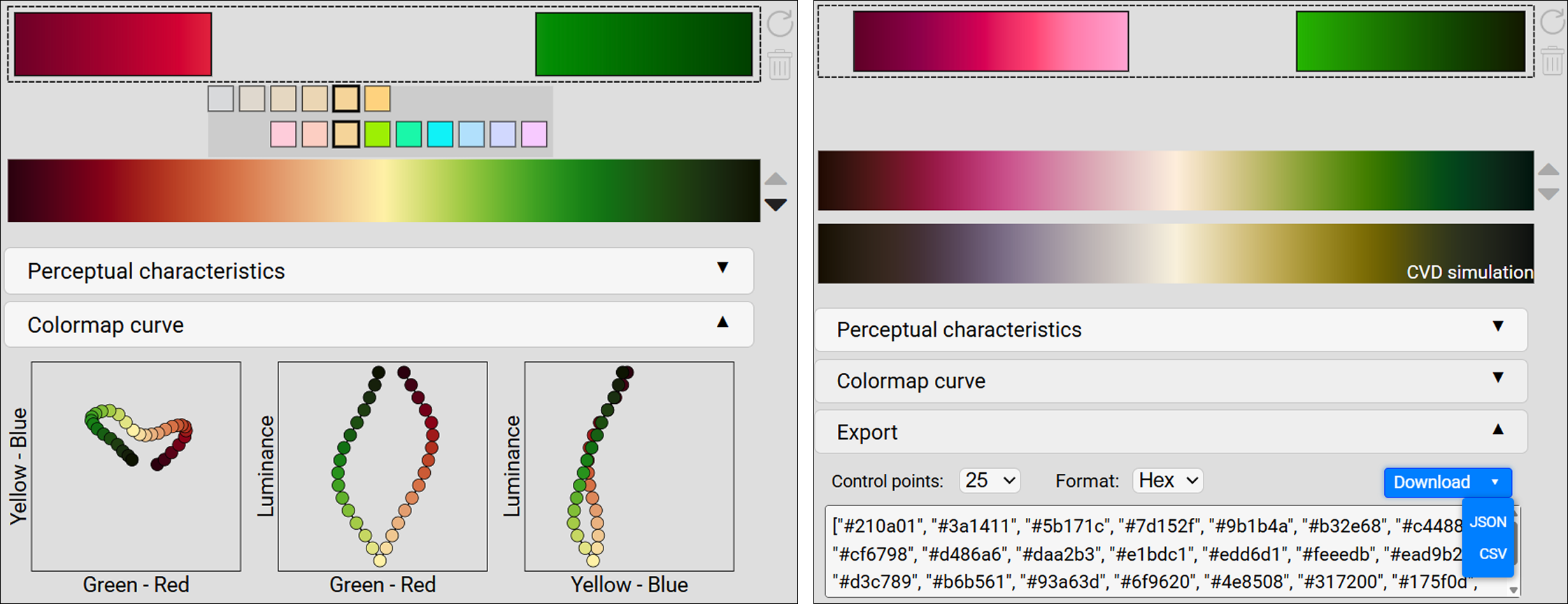
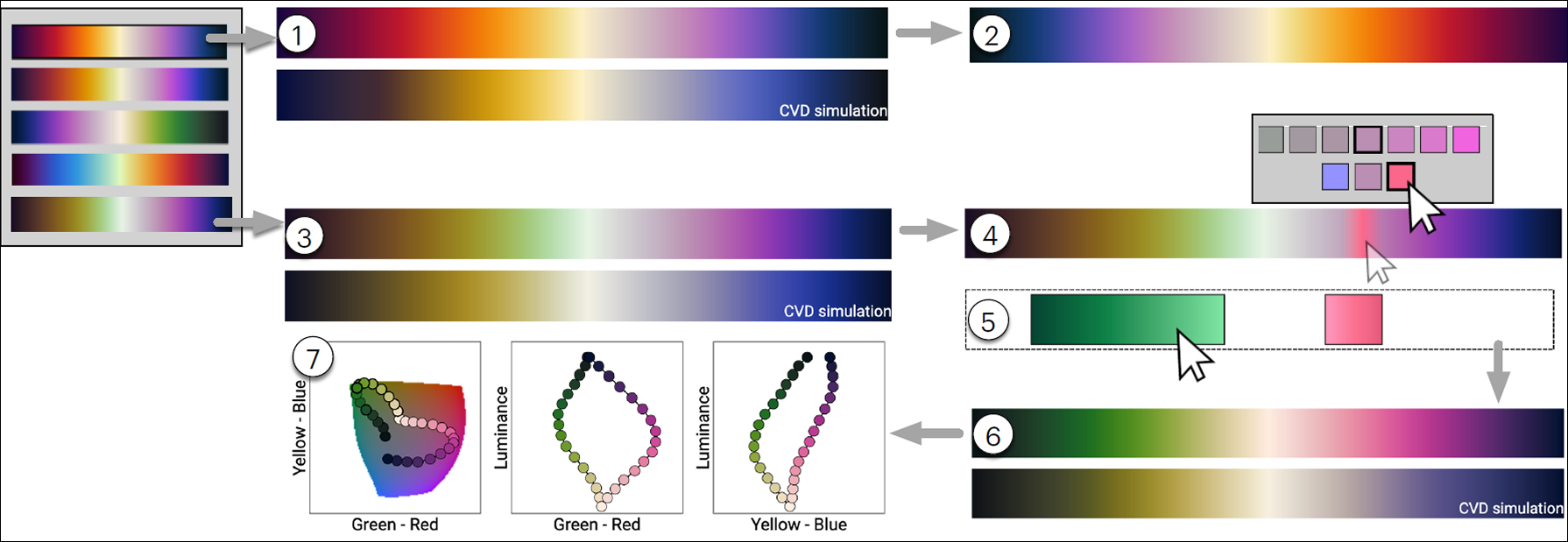
To make the colormap generation faster, I made the algorithm implementation automated on color selection. I further added 3 color vision deficiency metrics to the algoithm, which modifes the colormap to protect from the selected color deficiency.
Modified Picker and Editor
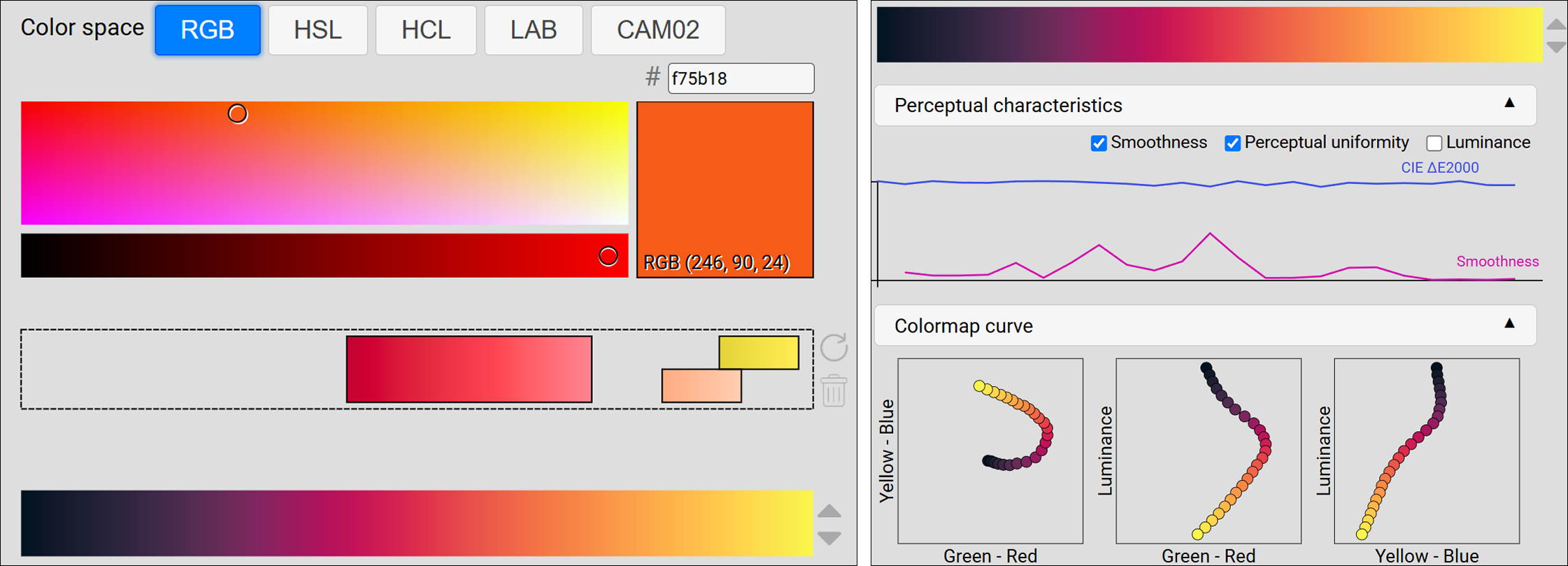
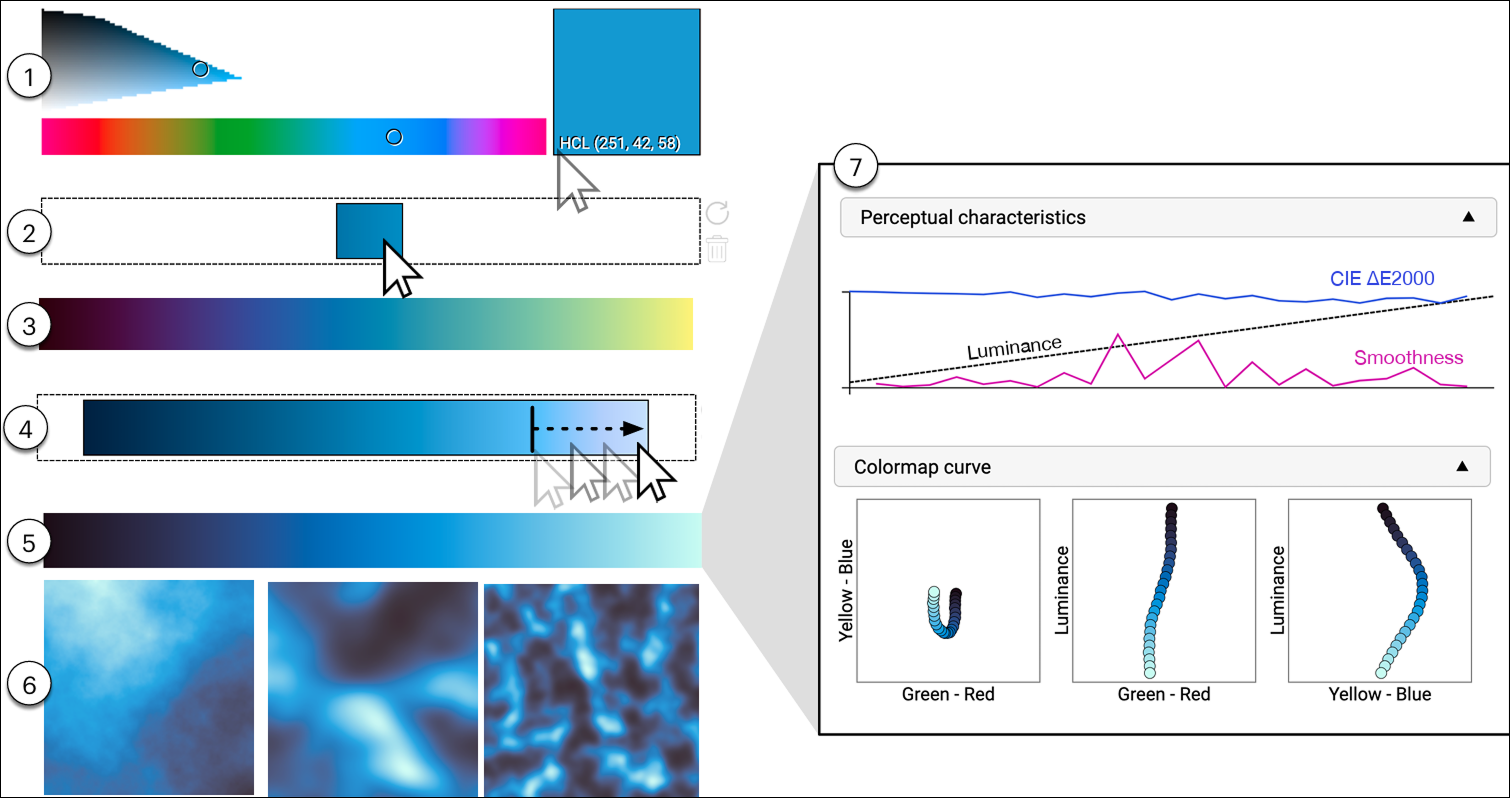
To ensure intuitive deisgn of the color selection, I added color pickers in 5 different color spaces, depending on the users' preference. I made further changes to the customizability, making editing and removing more intuitive. I also added sliders and luminance profiles for easy selection, while adding colorfulness and color quality sliders to adjust colormap optimization.
User Feedback Features
I added multiple features to help novice designers by providing them with feedback when using the tool. This included adding the time remaining when generating a colormap, providing assistance when selecting colors by showing the ideal locations on a color scale, and adding visualizations to test how colormap will lok for real-world visualizations. I further added tutorial videos to assist when using the color tool.
Final Color Tool
The final color tool allows users to quickly pick colors to generate perceptual, smooth colormaps based on their color preferences. It provides high level of customizations and optimization for multiple CVDs. The result is a powerful, intuitive, semi-automated tool which allows users to collaborate with the system to achieve their perfect colormap.
Use Cases
User Testing & Analysis
I conducted another round of user tests to analzye the final iteration of Colormaker, while additionally analyzing perceptual characteristics of colormaps generated by Colormaker with those considered as benchmarks.
Effective Colormaps
Users liked the quality of colormaps generated by the tool, praising the smoothness of the maps. The maps generated by Colormaker were more uniform and vibrant than the benchmarks.
Intuitive Color Specification
Most users found the color selection and editing as intuitive, appreciating the click-and-drag functionalities. They praised the customization options offered by Colormaker as compared to existing color tools.
CVD Optimization
Users appreciated the option of modifying for CVD in the color tool, as majority of softwares do not offer the option. Moreover, the CVD colormaps generated by Colormaker were more discriminable than regular colormaps.
"Clicking, dragging, sliding was very intuitive while optimization does a great job of smoothing things out." — Test Participant
Takeaways
Prioritize Customizability
Offering users—novice and experts—customization options allow them to modify colormaps based on their preferences, for personal projects or brand specifications.
Mixed-initiative Approach
Allowing a back-and-forth between user and the system allows a conversation to generate unique designs.
Design for CVD
Creating a one-of-a-kind tool for generating a diverse range of continuous colormap styles, including CVD-friendly designs is a great addition.